Remember to Refresh your page. [F5] in Internet
Explorer. [Ctrl+R] in Netscape.
Workgroup Templates in Microsoft Word
Workgroup templates are templates set up to be shared by
multiple users. There is no difference in the structure or content of
the templates themselves, merely in the location they are stored. They are
intended to be shared by different users of the same computer or on a network.
For instance if there are form documents used throughout an office, department,
household, or business, they are best stored as Workgroup Templates. Generally the workgroup templates are prepackaged templates for
use by more than one user, often company-wide. They can be used by an individual
to distinguish work templates from personal templates or finished templates from
development templates.
Personal templates are kept in the User Templates Folder. The
default location for these is described in
Normal Template in Microsoft Word - How to Open. The Normal Template is not
stored in the Workgroup Templates folder but in the User Templates Folder.
Another folder is the Default Save Location for New Templates
introduced with Word 2013. I generally recommend setting this to be the same
folder as the User Templates Folder, not the Workgroup Templates folder.
The location for Workgroup templates is set in Word's options.
It can be any folder but should probably be in the User Profile folder rather
than in the Documents Folder. There is no default.
Other Office Applications
The other Office Applications do not have any provision to set a
Workgroup Templates Folder. However, they may well share the designation in
Word's options. I know that a PowerPoint or Excel template stored in a folder
designated in Word as the Workgroup Templates folder will show up under Custom
templates in those applications.
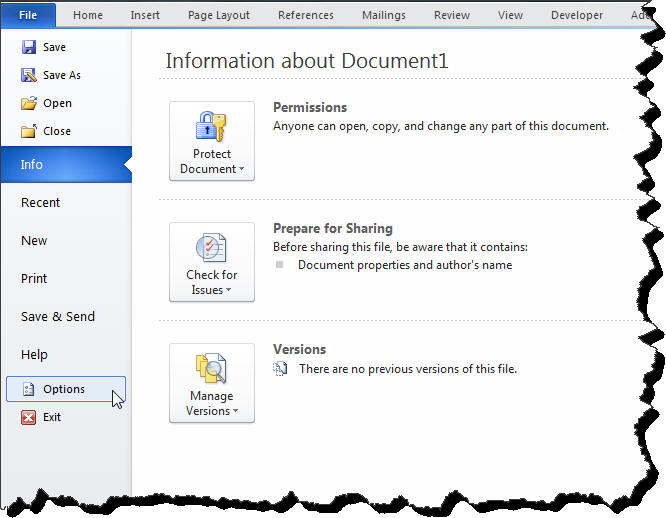
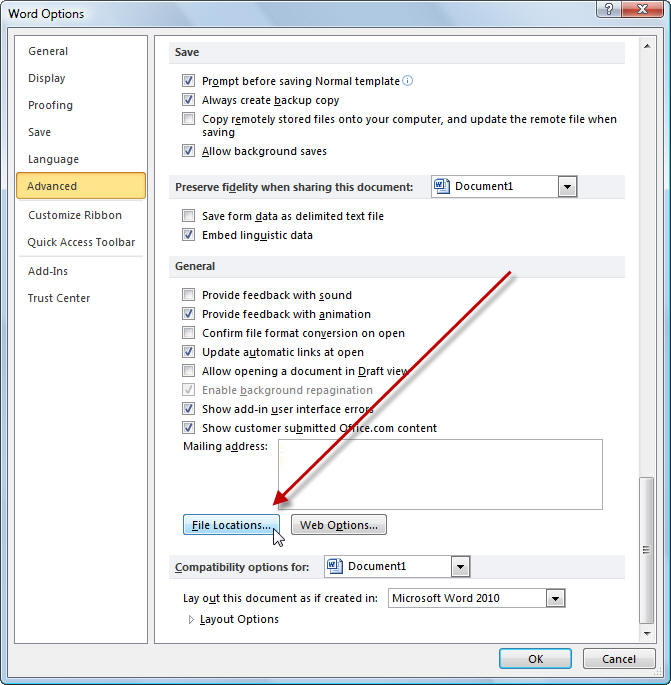
In Word 2010-2024/365 this is found/set under File > Options >
Advanced > File Locations (button near bottom)
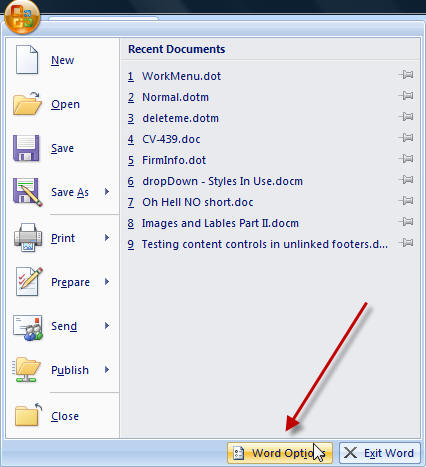
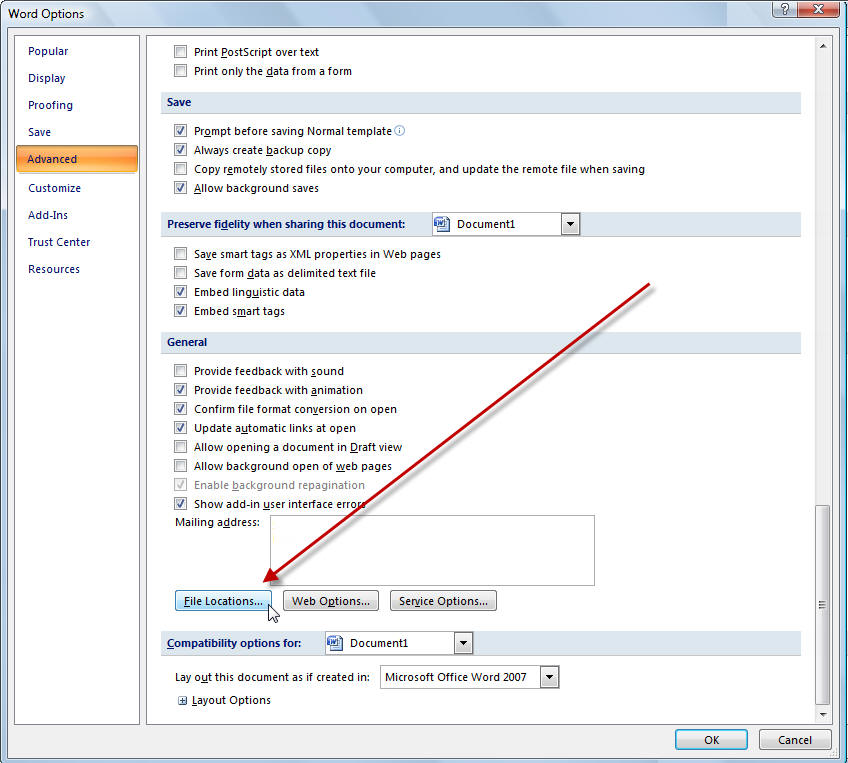
In Word 2007 this location is found/set under the Office
Button > Word Options (button) > Advanced > File Locations (button near
bottom)
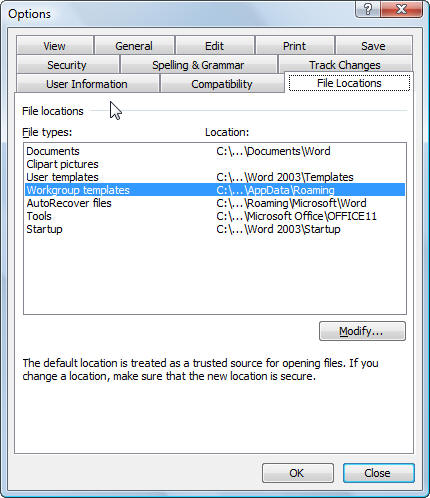
In Word 97-2003 this location is found/set under Tools >
Options > File Locations.
When a template is in the Workgroup templates folder it will be
available as a template in Custom under File New or "on my computer" or in "My Templates" to create new documents. If it is
in a
folder within the Workgroup templates folder, the name of that folder will show
up as a tab to sort out templates into categories. Again, see
Template Basics. For more about what
you see when you use File > New see
File > New variations in versions of Microsoft Word. What the user sees when
picking File New.
When workgroup templates are shared on a network, it is often
advisable to copy them to the local computer as a part of the login process
rather than share them directly. Otherwise, if a template is being used by any
user it cannot be edited by support personnel without locating the user and
asking them to close their work. This also gives laptop users access to the
workgroup templates.
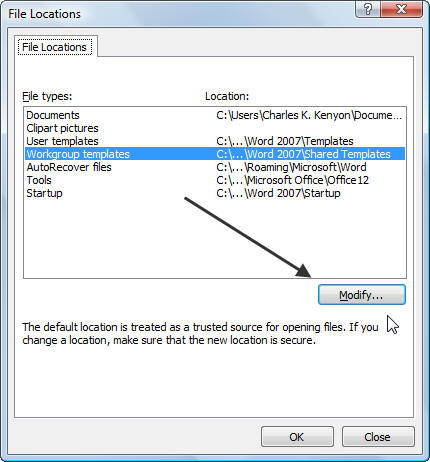
If the Workgroup Templates location has already been set,
once you've clicked on the Modify button you can find the
actual location.
Once you have the Modify dialog open, go up one level to see
the folder that holds the Workgroup Templates folder. Right-click on the
Workgroup Templates folder
to get its properties. One of those properties is the location. This will
probably be a longer line than you can read in the properties box. You can
select it with your mouse, though, and copy it.
With that address copied into the Clipboard, close and
cancel your way out of the Word Options. Do not modify this location without
a good reason.
Paste the address into the address box in a Windows Explorer
window to get to the Workgroup Templates folder.
If you want, use the following macro and it will tell you what
the setting is for the workgroup templates on your computer. It works in all
versions of Word from Word 97 on.
Sub ShowWorkGroupFolder()
'
' ShowWorkGroupFolder Macro
' Macro written 11/04/2000 by Charles K. Kenyon
' Displays currently set WorkGroup Folder location for application
'
' If this is being run with the file containing the code as the
Active Document,
' it will further instruct the user that the
' startup folder is the location to hold this file.
' Otherwise, it just gives the information.
'
On Error GoTo ErrorHandler
'
Selection.Collapse ' to keep from deleting macrobutton by a keypress
after running macro
'
'
'
MsgBox Prompt:="Your WorkGroup Templates Folder location is " & _
Options.DefaultFilePath(wdWorkgroupTemplatesPath), Buttons:=vbOKOnly,
_
Title:="Current WorkGroup Templates Folder Setting
Information"
'
On Error GoTo 0
Exit Sub
'
ErrorHandler: ' No Workgroup Templates Folder Loctation set
MsgBox Prompt:="The location of the WorkGroup Templates Folder has not
been set on this Computer." _
& Chr(13) & Chr(10) & Chr(13) & Chr(10) & _
"You can set a folder location now.", _
Title:="No WorkGroup Templates Folder Location Set", _
Buttons:=vbInformation
Dialogs(wdDialogToolsOptionsFileLocations).Show
On Error GoTo 0
End Sub
You can download a document containing this macro from my
downloads page.
Otherwise, see Graham Mayor's page on
Installing Macros.
Changes / suggestions / ideas can be sent to
Charles
Kenyon.
Page views since 23 November 2011
Many people visit this site and use the information it
contains.
It costs money to keep on line and effort to update.
If you have
received assistance here
please consider making a donation if you can.